Introduction
Joomla Tree Structures
Joomla implements menuitems and categories as tree structures. This means, for example, that menuitems on a menu can have submenus off them (as can be seen on the Joomla admin menu) and those submenuitems can in turn have submenus off them, and so on. The submenus are ordered, so you can define which order the submenuitems appear.
Joomla uses the following terminology:
- each of the records is a node within the tree structure
- there is a root node which occupies the highest position in the hierarchy; this root node is defined as being at level 0
- the root node has a number of children, and these will be at level 1. Each of these children's parent is the root node
- these children may in turn have children of their own, at level 2, and so on
- if a node has no children, then it is known as a leaf node
Nested Sets
To implement this tree structure within a relational database Joomla uses the Nested Set Model.
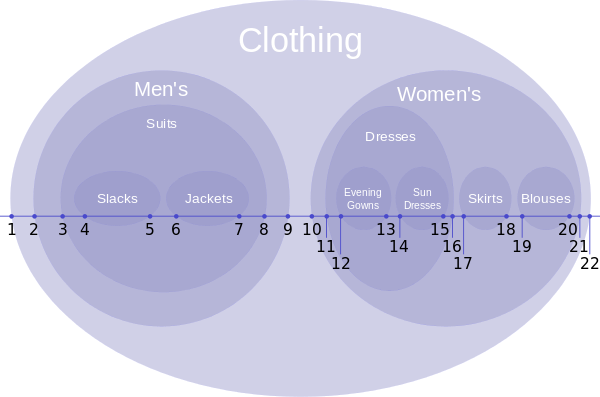 ]
]
| Node | Left | Right |
|---|---|---|
| Clothing | 1 | 22 |
| Men's | 2 | 9 |
| Suits | 3 | 8 |
| Slacks | 4 | 5 |
| Jackets | 6 | 7 |
| Women's | 10 | 21 |
| Dresses | 11 | 16 |
| Evening Gowns | 12 | 13 |
| Sun Dresses | 14 | 15 |
| Skirts | 17 | 18 |
| Blouses | 19 | 20 |
This involves assigning to each record a left (in Joomla lft) and a right (in Joomla rgt) field, as shown in the diagram and associated table. You should be able to see how using the lft and rgt values you can determine for any node its level in the tree, its parent, and for nodes with the same parent, the ordering of those nodes.
While having lft and rgt values may be sufficient to define a tree completely in theory, in practice adding additional fields gives more opportunity for navigating the tree efficiently, and in Joomla there are 5 fields associated with a tree structure:
- lft and rgt fields
- parent id – the id of the parent node
- level - the level in the hierarchy, level 0 (Clothing in the example above) being the highest
- path
The path is like the path in a directory structure, and is a join of the alias values going from the root node to the node in question, with a slash separating the aliases. For example, referring to the diagram above, if Clothing is the root node, then the path for Jackets would be Men's/Suits/Jackets.
Notice how the additional fields provide us with efficient mechanisms for navigating the tree. For instance, we can do a query selecting records WHERE parent is Suits, and ORDER BY lft, and that will give us Slacks and Jackets in order. These sorts of operations are generally done on the front end, where we want the site to perform well. By contrast, admin operations can involve many updates. For example, if we move Blouses to be the first child under Men's then it will involve updating the lft and rgt values of nearly all the records in the database table.
This document describes the library functions with Joomla provides to support managing tree data implemented in a nested set.
The API is defined at Joomla Nested APIs.
Instantiating your table class
If your extension implements a tree hierarchy in its associated database table, then you should define your table class to inherit from Joomla\CMS\Table\Nested instead of from Joomla\CMS\Table\Table. Then you can instantiate an instance in the same way as described in Basic Table instantiation.
In the descriptions below, it's assumed that $table is a reference to your table instance, eg:
$table = $this->getTable('example'); // to get the ExampleTable class
Root Node
Setting the Root Node
Joomla doesn't provide an API call to set a root node, and the easiest way to accomplish this for a component is to insert the root node record when you create the database table in your install SQL file. You should set:
- parent_id - 0
- lft - 0
- rgt - 1 (assuming you're not inserting other nodes at the same time)
- level - 0
- alias - "root" (for example)
- path - ""
Getting the Root Node
Use getRootId():
$rootId = $table->getRootId();
Tree nodes and traversal
Reading a node
To retrieve a single node you use the load() method, passing the primary key, as usual:
$table->load($pk);
The fields of the node record are then available as properties of the $table object.
Identifying a leaf node
A leaf node is one that has no child nodes beneath it. To determine if a node is a leaf node, use code like the following:
if ($table->isLeaf($pk))
{
  echo 'This is a leaf node';
}
else
{
  echo 'This is not a leaf node';
}
If you don't specify the $pk parameter then the currently loaded record is assumed.
Retrieving a Subtree
To retrieve an entire subtree given the id of the base node of the subtree, use code like the following:
// If $id is the id of a node, retrieve the subtree with this node as its root.
$subtree = $table->getTree($id);
print_r($subtree);
This will retrieve an array of all the nodes in the subtree.
The array is one-dimensional and lists the nodes in preorder traversal order.
Note that if your table is large then calling getTree() from the root node will retrieve the entire table and may cause memory problems.
Use it with caution.
Retrieving a Path
To retrieve all the nodes from the root node along the path leading to a specified node, you can use code like this:
$pathNodes = $table->getPath($pk);
print_r($pathNodes);
This will retrieve a one-dimensional array of all the nodes from the root node along the path leading to the node specified by $pk.
Node CRUD Operations
Inserting a node
Inserting a node is more complex in this case because you need to define where in the tree the new record should be placed.
To do this you call setLocation() to specify the location with reference to a node defined in $referenceId:
$table->setLocation($referenceId, $position);
where $position can be:
- "before" - the new node will be inserted before the reference node but at the same level.
- "after" - the new node will be inserted after the reference node but at the same level.
- "first-child" - the new node will be inserted as the first child node of the reference node.
- "last-child" - the new node will be inserted as the last child node of the reference node.
After you set the position you insert the record using the same functions as for Joomla Table:
$table->setLocation($referenceId, $position);
$table->bind($data);   // for an insert the primary key within $data should not already exist in the database table
$table->check();
$table->store();
In order to maintain the integrity of the data structure, the table is locked during a node insertion operation. Adding a new node to a large table is an expensive operation as the table could potentially be locked for a considerable period. Take this into account when designing your application.
Updating a node
If you are updating the data of a node but not changing its position in the tree, then you do this in exactly the same way as you would update a record in a regular database table using the Table class.
$table->bind($data);
$table->check();
$table->store();
If you are also updating the position of the node in the tree then you must call setLocation() first, as described above:
$table->setLocation($referenceId, $position);
$table->bind($data);
$table->check();
$table->store();
Note that if you're updating the position of a node, and that node has a subtree of children, then those children will get moved with that node.
Publishing state changes
There are special considerations for changing the published state of a record,
as you would generally not expect a child node to have a "Published" state if the state of its parent is "Unpublished".
Joomla provides the publish method to help with this:
$table->publish($pks, $state, $userId);
where:
$pksis an array of the primary keys of the affected records$stateis the state to be applied - Joomla applies consistency checks to this value (eg to avoid a node being set to published if one of its parents is unpublished), and recursively applies this state down through nodes of the subtree below the node.$useridis the$useridof the user performing the change - if the database table supports checkin/checkout then Joomla checks that none of the subtree nodes are checked out to other users
Deleting a node
If you delete a node in the tree then you must consider what to do with the child nodes in the subtree below it.
$table->delete($pk, true);   // deletes the node identified by $pk, and deletes all of its children as well
$table->delete($pk, false);  // deletes the node identified by $pk, and moves all of its children up a level in the tree
Rearranging a tree
moveByReference
$table->moveByReference($referenceId, $position, $pk, $recursiveUpdate)
This moves the node which has primary key $pk and all of its children to a new position in the tree.
The new position is specified by the $referenceId and $position, as described for setLocation
in Inserting a node above.
The API defines the 4th parameter as "Flag indicate that method recursiveUpdatePublishedColumn should be call." This function will adjust the published state of the moved nodes so that they are not inconsistent with the new parents, similar to as described in Publishing state changes above.
Order up and Order down
These functions move a node to the left or right at the same level:
$table->orderUp($pk);    // moves a node one position to the left at the same level
$table->orderDown($pk);  // moves a node one position to the right at the same level
move
This is a more generalised function which allows you to move a node to another position at the same level.
Note that you don't specify a $pk as a parameter, and the function moves the currently loaded node.
$table->move($delta, $where);
The $where is a SQL WHERE clause which limits where you are going to move the node.
The move method finds the records at the same level which match your WHERE clause.
If $delta > 0 then it finds the first record to the right, and moves the currently loaded node to the right of it.
If $delta <= 0 then it finds the first record to the left, and moves the currently loaded node to the left of it.
Despite what the API definition says, the magnitude of $delta is irrelevant.